Bridges

Going through ALPR data, I noticed how some ALPR cameras were not positioned in typical areas or near the intersection of roads. Rather, these were installed at the intersection of roads and rivers. These bridges represent chokepoints in the road network that are unavoidable. For example, South of the Ohio river there are only 18 crossings (excluding ferries) along the Mississippi river wikipedia page. That is an area of ~800km / ~500miles. Thus, to observe all interstate traffic would use a trivial number of cameras. The same vulnerability exists on smaller rivers as well.
There is also the aspect that rivers tend to delineate the municipal boundaries. Municipalities/states will tend to place ALPRs around their perimeter. Although not a deliberate effort to monitor these “chokepoints”, the end result is the same.

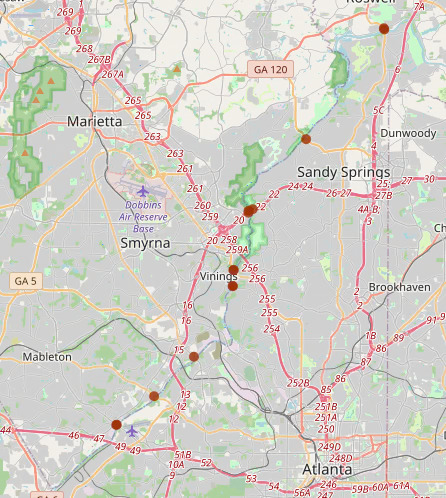
Example:

Most of the ALPRs in the example above are on one side of the river. Thus, the county on the left is likely putting ALPRs all around the perimeter of the county.


What are Typical areas? (with overpass turbo queries):
In vicinity of ramps of large roads
nwr[highway=primary_link]({{bbox}});
nwr[highway=secondary_link]({{bbox}});
nwr[highway=motorway_link]({{bbox}});

Hospitals
nwr[amenity=hospital]({{bbox}});
nwr[healthcare=hospital]({{bbox}});

Parks
nwr[leisure=park]({{bbox}});

Shopping Malls
nwr[shop=mall]({{bbox}});

Sports Pitch
nwr[leisure=pitch]({{bbox}});

Warehouses
Police Departments / Correctional Facility
Lowes/Home Depot
Higher density housing (HOA areas/new builds)


The following ALPRs were detected within 100 meters of a bridge that crossed over a river.

Code
import pandas as pd
import geopandas as gpd
import folium
import itables
from datetime import datetime
from folium.plugins import MarkerCluster

m = folium.Map([35, -100], zoom_start=4)

bridgegdf = gpd.read_file("../../../osmetc/bridges.gpkg")
bridgegdf = bridgegdf.drop(["man_made", "river_waterway"], axis=1).rename({"alpr_osmid":"ALPR ID","alpr_highway":"ALPR highway","camdir":"Direction 1","camdir2":"Direction 2","road_osmid":"Road ID","road_name":"Road Name","road_highway":"Road Type","river_osmid":"River ID","river_name":"River Name"}, axis=1)

marker_cluster = MarkerCluster(disableClusteringAtZoom=10).add_to(m)

for idx, row in bridgegdf.iterrows():
    popup_html = f"<style> th\
                {{border:1px solid black;\}}</style>\
                <table><tr>\
                    <th>Road: </th>\
                    <th>{row['Road Name']}</th>\
                </tr><tr>\
                    <th>Road Type: </th>\
                    <th>{row['Road Type']}</th>\
                </tr><tr>\
                    <th>ALPR ID: </th>\
                    <th>{row['ALPR ID']}</th>\
                </tr><tr>\
                    <th>Road ID: </th>\
                    <th>{row['Road ID']}</th>\
                </tr><tr>\
                    <th>River ID: </th>\
                    <th>{row['River ID']}</th>\
                </tr><tr>\
                    <th text-align='center' colspan='2'><a href='https://www.openstreetmap.org/node/{row['ALPR ID']}' target='_blank'>https://www.openstreetmap.org/node/{row['ALPR ID']}</a></th>\
                </tr></table>"
    folium.Circle(
        location=[row.geometry.y, row.geometry.x], 
        popup=popup_html, fill=True, radius=20, weight=9,color="#9E2F02",opacity=0.8,fillOpacity=0.5
    ).add_to(marker_cluster)

m
Make this Notebook Trusted to load map: File -> Trust Notebook
Code
itables.show(pd.DataFrame(bridgegdf.drop(["geometry"], axis=1)), maxBytes=200000, allow_html=True)
Loading ITables v2.7.3 from the internet... (need help?)
Road name is missing?

Some bridges lack the “name” tag that is available in other bridges/roads. However, YOU can help correct the OpenStreetMap data by copying over the tag from the other segments of the road.